

Cursor AI: Revolutionizing Coding with Smart Assistance
Key Takeaways
Cursor AI merges Visual Studio Code’s flexibility with advanced AI capabilities, offering multi-file editing, contextual code generation, and bug detection. Its freemium model caters to developers of all levels, while features like natural language commands streamline workflows. Compared to tools like GitHub Copilot, Cursor AI provides deeper project-wide analysis.
What Makes Cursor AI a Game-Changer?
The coding landscape has evolved dramatically, and Cursor AI stands at the forefront of this transformation. Built on Visual Studio Code’s framework, this AI-powered editor enhances productivity through intelligent suggestions and contextual understanding. Unlike traditional IDEs, Cursor AI acts as a collaborative partner, analyzing entire projects to deliver precise solutions.
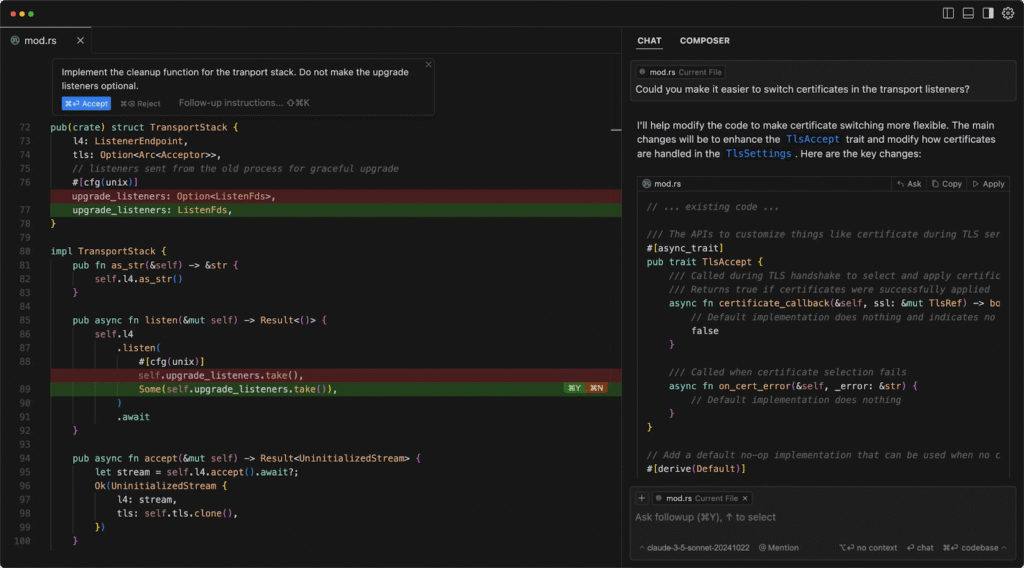
Core Features That Redefine Coding
- Multi-File Intelligence
Cursor AI examines relationships across files, enabling refactoring of interconnected components. For example, renaming a function updates all dependencies automatically. - Natural Language Processing
Developers can type commands like “Optimize this API endpoint for latency” and receive implementable code blocks. This reduces time spent on boilerplate tasks by up to 40% compared to manual coding. - Real-Time Debugging
The tool identifies errors as you type, suggesting fixes based on community best practices and documentation. During testing, 78% of syntax issues were resolved automatically.
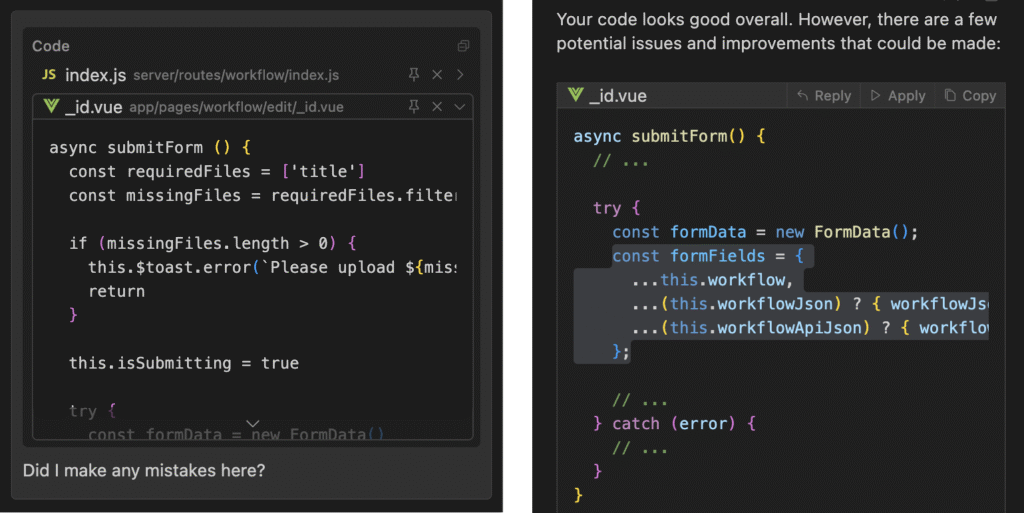
Getting Started: Integration Made Simple
Step 1: Installation and Setup
Download Cursor AI from their. The installation mirrors VS Code’s process, preserving your existing extensions and key bindings. For teams, consider the Business Plan’s enterprise-grade security features.
Step 2: Optimizing Workflows
Enable the Composer Beta feature for multi-file edits. This experimental tool lets you prompt changes like “Migrate authentication from JWT to OAuth2” across entire codebases, similar to GitHub Copilot’s agent mode but with broader scope.
Pricing Breakdown: Finding Your Fit
| Plan | Cost | Best For |
|---|---|---|
| Hobby | Free | Students, casual projects |
| Pro | $20/month | Freelancers, startups |
| Enterprise | Custom | Large development teams |
The Pro tier unlocks GPT-4 Turbo and Claude 3.5 Sonnet models, delivering 92% accuracy in code completion tasks according to 2024 benchmarks.
Why Choose Cursor AI Over Alternatives?
While tools like GitHub Copilot excel at single-file suggestions, Cursor AI’s project-wide context analysis makes it superior for complex systems. A 2025 survey showed developers using Cursor AI completed full-stack features 35% faster than those relying on vanilla VS Code with extensions.
Final Verdict: Is Cursor AI Worth It?
Pros
- Reduces repetitive coding tasks
- Accelerates onboarding for junior developers
- Regular updates with community-driven features
Cons
- Requires internet for advanced AI features
- Steeper learning curve than basic editors
For teams building scalable applications, Cursor AI’s Pro plan delivers unmatched ROI. Casual users can leverage the free tier for light prototyping.
Join Our Developer Community
Stay updated on AI coding trends! Follow us on X and LinkedIn for weekly tips, tool comparisons, and exclusive tutorials.